

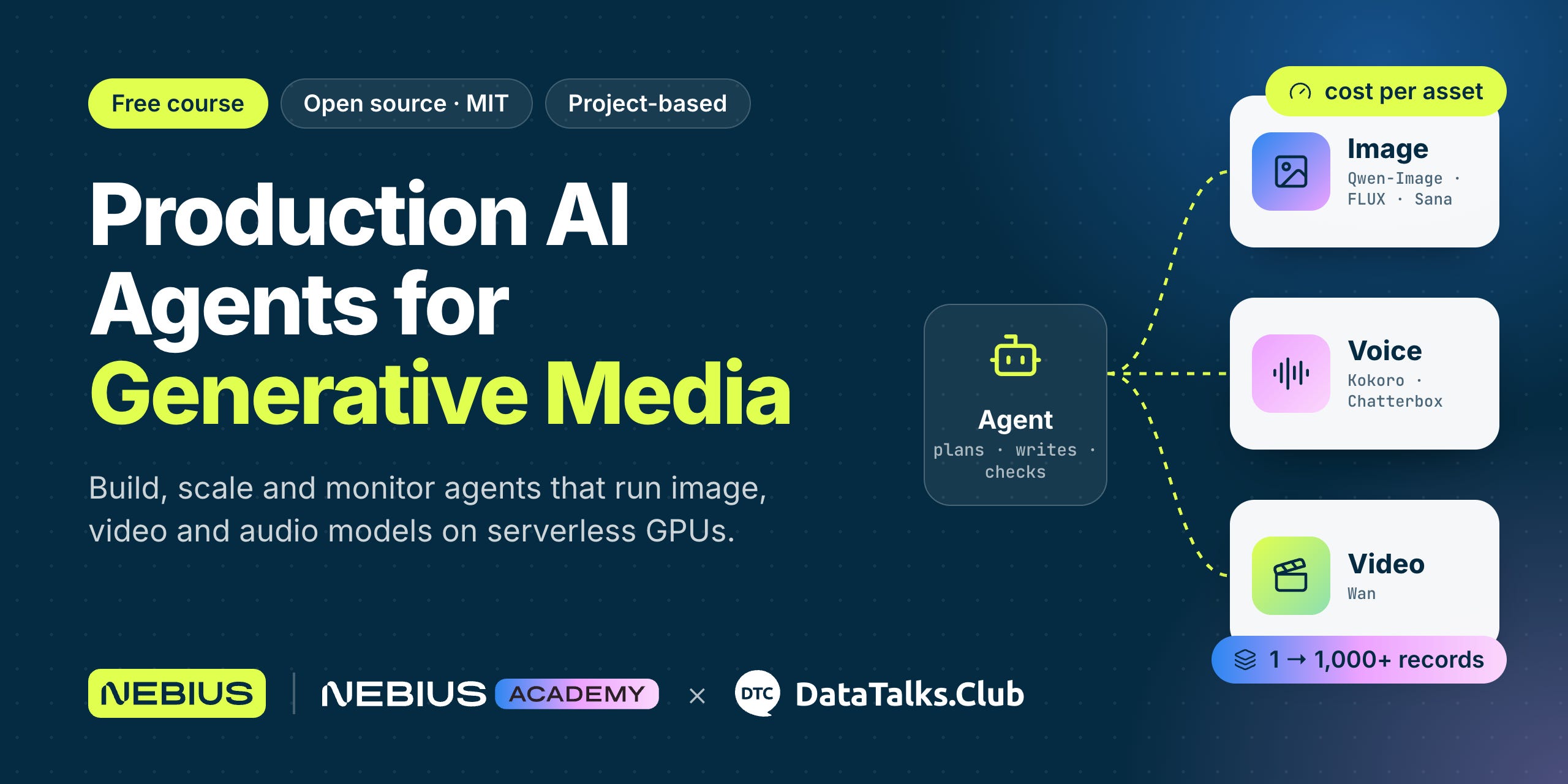
On Monday, we start Production AI Agents for Generative Media. It’s a new free course at DataTalks.Club, and we run it together with Nebius.
In the course, we generate images, voice, and video with open-weight models. We need GPUs to run these models, and Nebius gives course participants GPU credits through the Nebius AI Builder Program.
Generating one image is easy. But when we need a thousand images or videos, we quickly run into problems.
In the course, we deal with these problems:
GPUs are expensive, and we pay for every hour
GPU jobs fail halfway, and we don’t want to pay for the same work twice
Videos are large, so sending them back in an API response is slow
Agents aren’t reliable, and the quality changes from run to run
We build an agent that takes a short brief and produces an image, a voice track, or a video. It checks the result, and if the result isn’t good enough, it tries again. Then we scale it from one record to thousands.
In this post, I’ll cover:
What we build in the course
The content of each module
Our capstone project at the end of the course
How to apply and how the GPU credits work
We also talked about the course and answered many questions in the recent Q&A stream. You can watch it here:
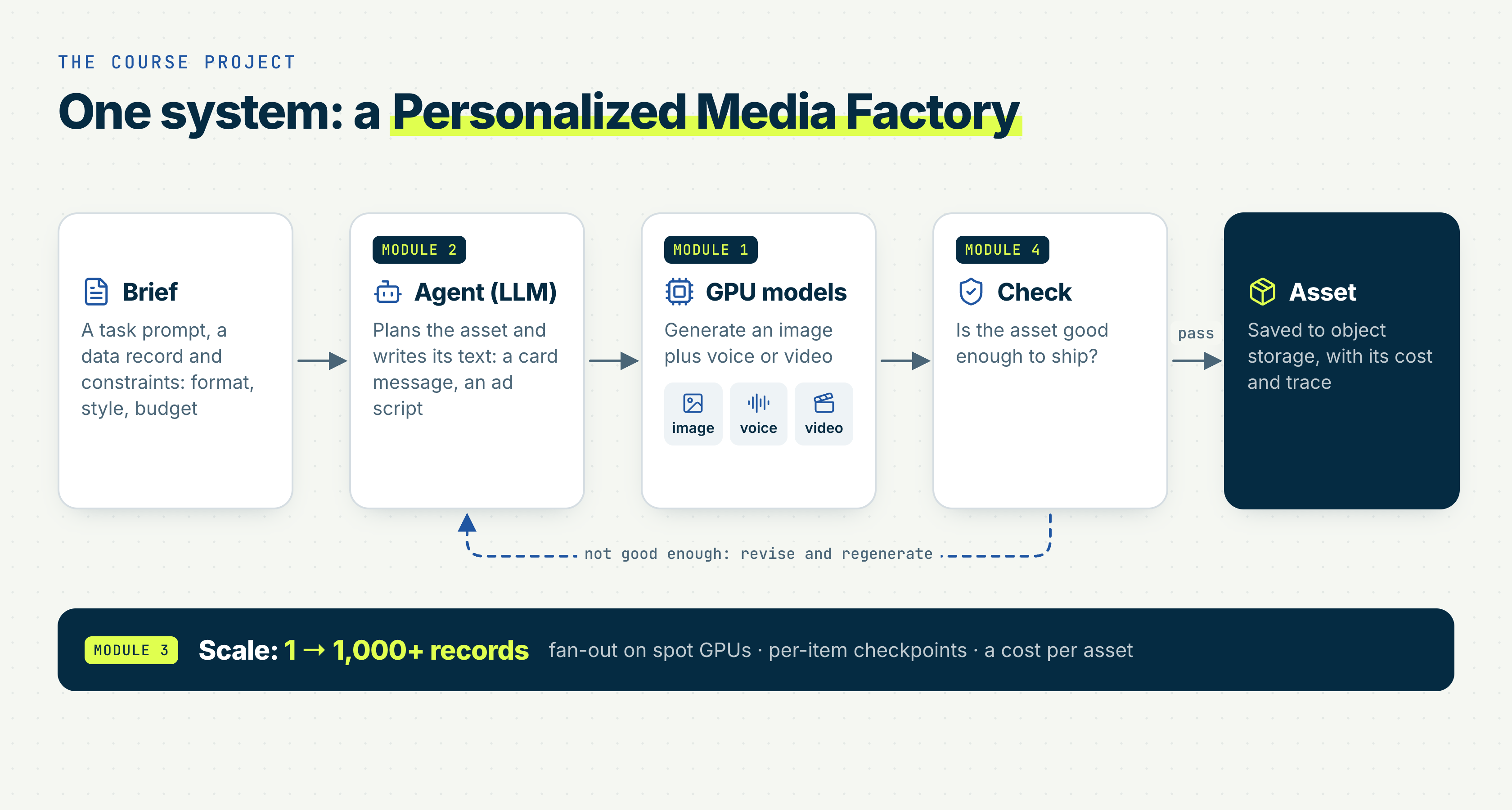
The Media Factory
In the course, across all four modules, we build a media factory. We give it a record from our data, and it makes a personalized card or ad for it.
First, the agent plans what the asset should look like and writes the text for it
Then it calls GPU models to make the image and the voice or video
If the result doesn’t look good enough, the agent throws it away and tries again
We start with one record and then scale to thousands.
Course Structure
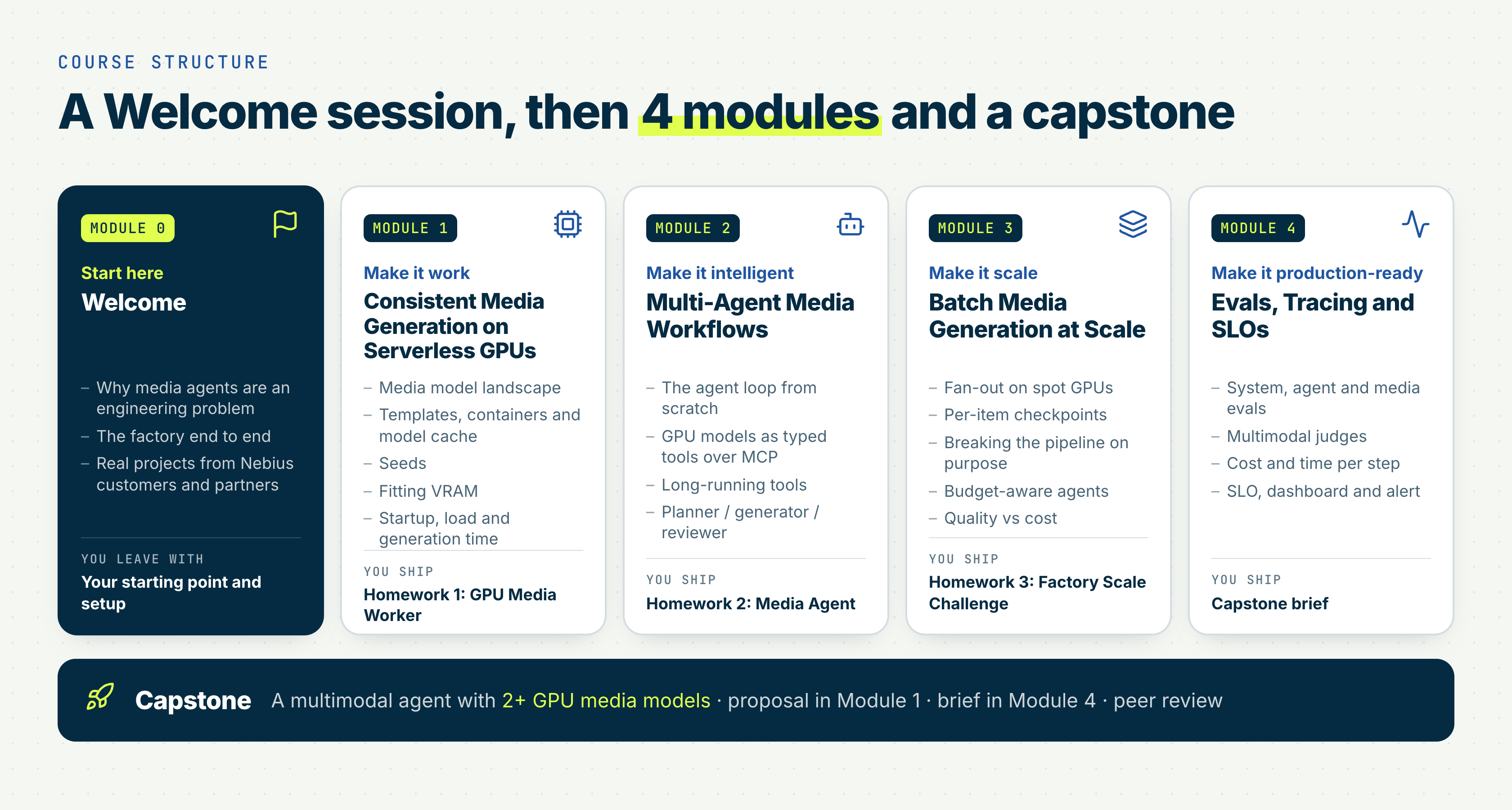
We start the course on Monday with a launch session, then go through four modules, and finish with the capstone project.
Module 1: Consistent Media Generation on Serverless GPUs
In the first module, we make media generation work. We give it two weeks, so people who join after the start can still catch up.
In this module, we:
Get an overview of image, video, and audio models
Generate our first image, video, or audio in a few minutes
Package a model in a container
Run it as an Endpoint for serving and as a Job for batch inference
Measure how much one asset costs
In the homework, we:
Generate an asset for our own creative idea
Calculate when self-hosting becomes cheaper than paying an API
Write a one-page proposal for the capstone
Module 2: Multi-Agent Media Workflows
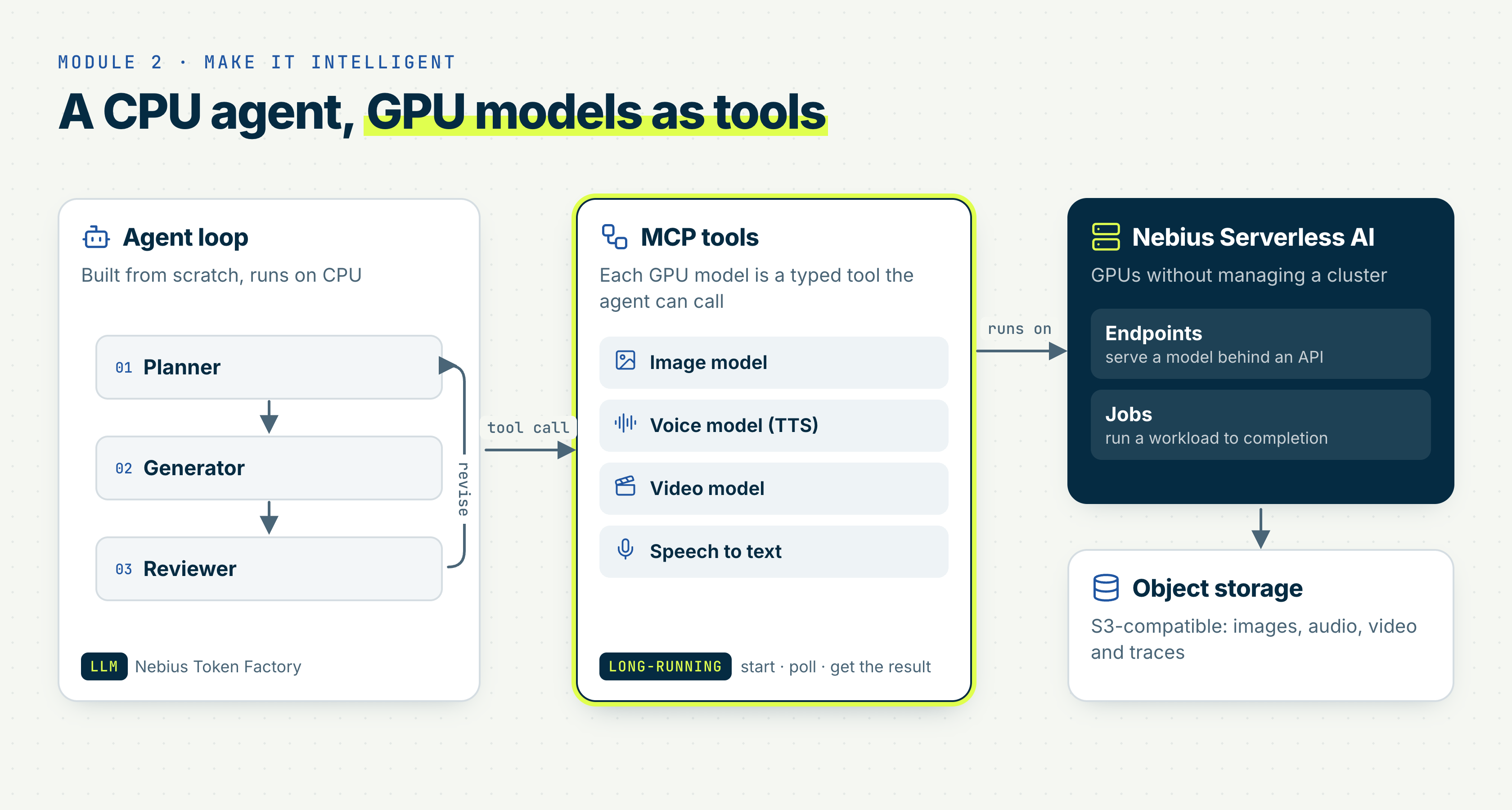
In the second module, we build the agent. It runs on a CPU and uses the GPU models as tools.
In this module, we:
Submit long-running generation jobs and poll for the result instead of waiting for minutes
Resume a failed run without paying for the same GPU work again
Build the agent from a planner, a generator, and a reviewer
Check each asset against a versioned rubric and generate it again if it doesn’t pass
Define a creative direction and keep the agents aligned with it
In the homework, we:
Build an agent that makes a coffee ad of about 10 seconds
Let it write a plan, make a keyframe (one still image from the video), and review it before it generates the video
Trace every step to see how much each one costs
Module 3: Batch Media Generation at Scale
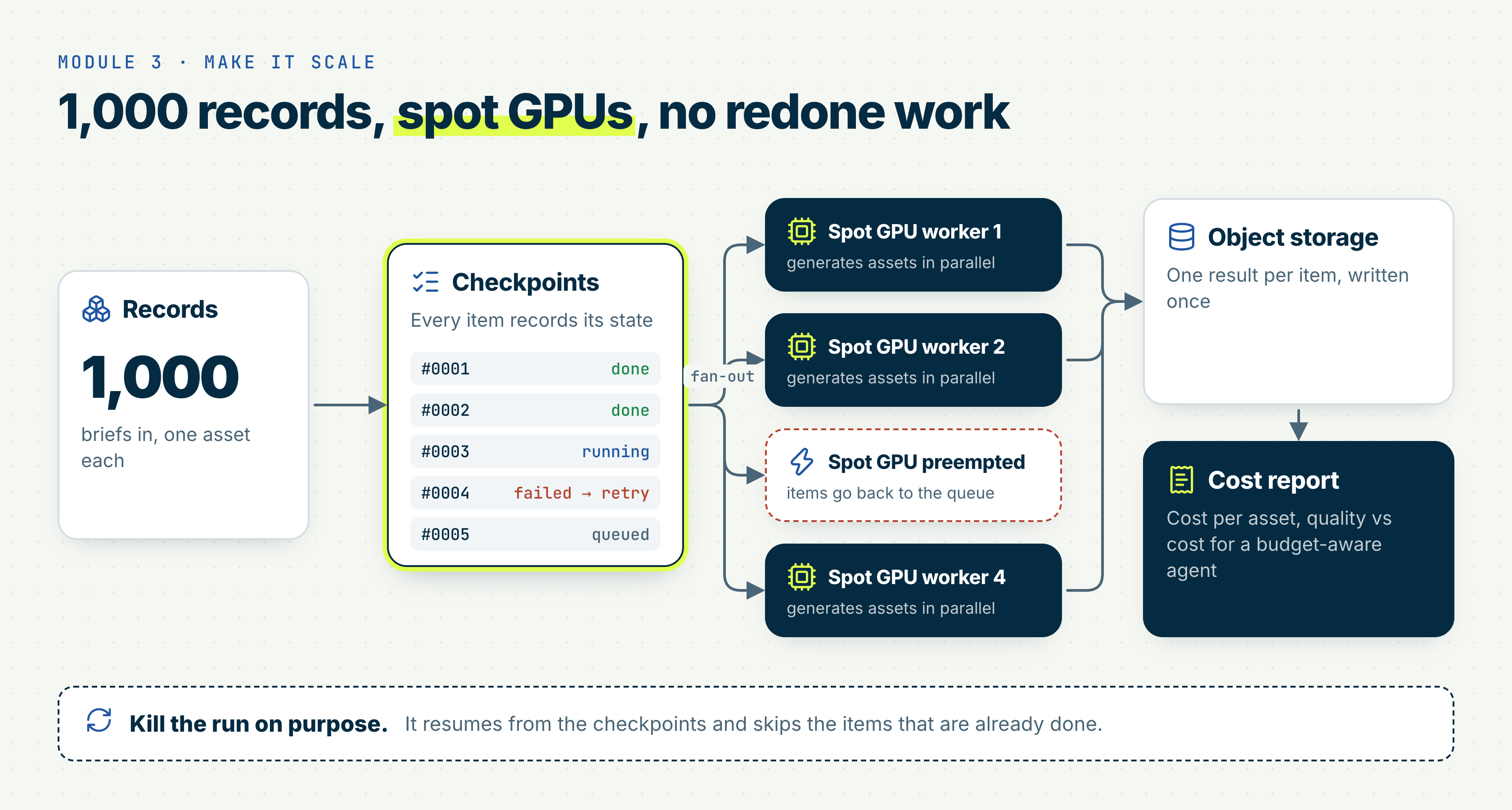
In the third module, we scale the factory to thousands of records. Some workers will fail, and we don’t want to lose what they already finished.
In this module, we:
Spread the records across parallel Jobs and save a checkpoint after each item
Kill a run on purpose and check that it continues where it stopped
Run the Jobs on spot (preemptible) GPUs, which cost $0.80 to $1 per hour last week
Put videos in S3-compatible storage and pass links instead of sending the files in API responses
See how cold starts, generation time, and the GPU type change the cost of one asset
In the homework, we:
Generate a card text, an image, and a voice track for 200 records, with 10 spot GPU Jobs in parallel
Kill the run halfway and resume it without regenerating finished items
Calculate how much one asset costs, counting only the assets that passed the quality check
Everyone uses the same records and the same models, so we can compare the costs on a public leaderboard.
Optional lesson: Fine-Tuning
We’ll also have an optional lesson about fine-tuning an image model for a specific style.
A few weeks ago, Nebius ran a hackathon in Berlin about it. People trained LoRA adapters to generate media in a specific style. It took them only a few hours, and the results became much more consistent.
In the lesson, we’ll show how to do the same.
Module 4: Evaluation, Observability and Production
In the last module, we make the system production-ready.
In this module, we:
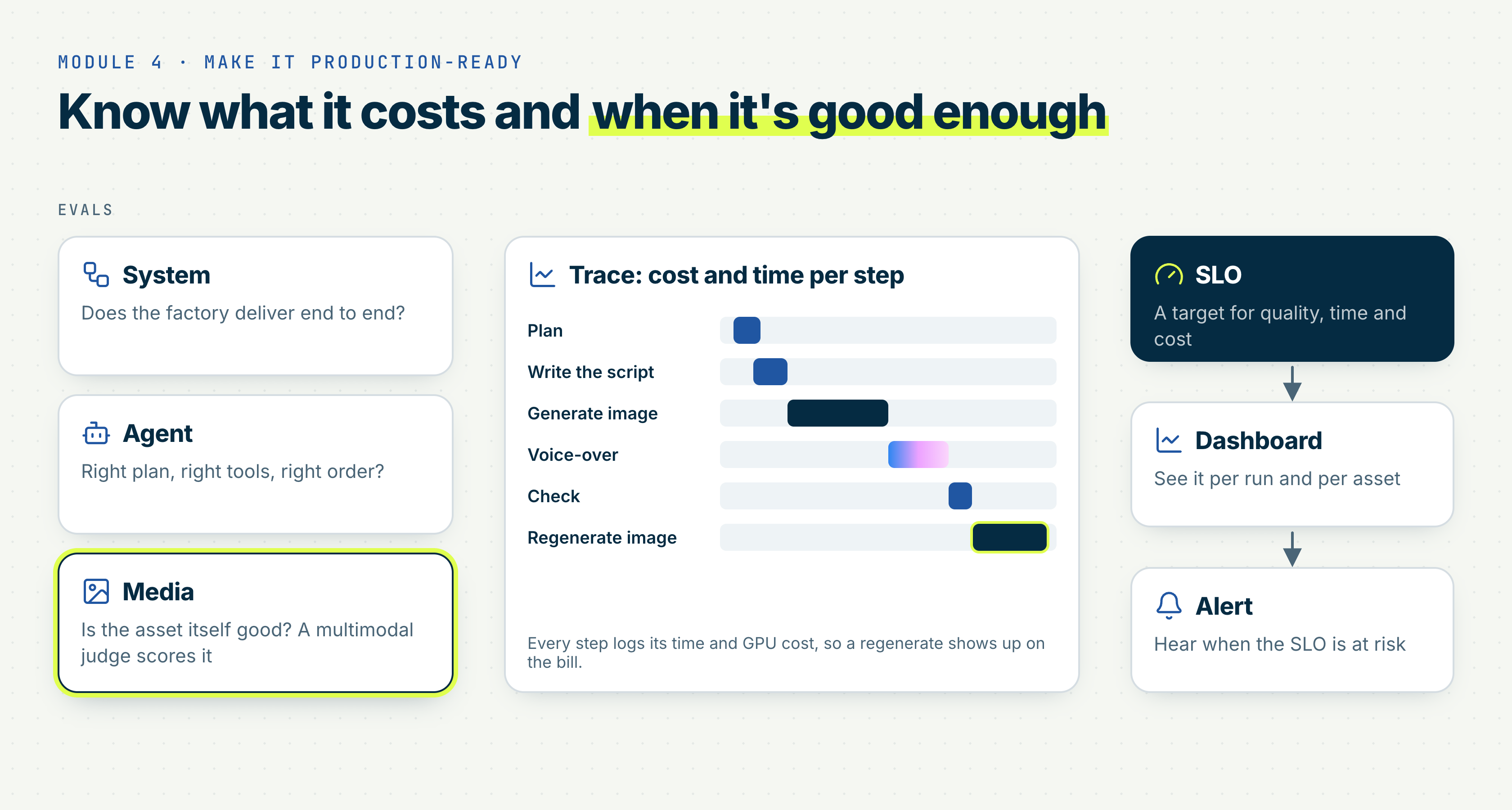
Add cheap deterministic checks and a multimodal judge that we calibrate on our own labels
Add a golden set to evaluate the system
Trace every call to see how much generation costs and how long it takes
Define an SLO (a target for speed and reliability) to know when something needs our attention
Look at auth, quotas, and abuse
Look at prompt injection, content safety, and licensing
There’s no homework in this module. Instead, we apply all of it in the capstone project.
The Capstone
For the capstone, you build your own agent with at least two GPU media models. You run it on Nebius Serverless AI and share it publicly.
We’ll grade your system and the engineering behind it, not how pretty the pictures are (but pretty images will be a plus!).
Your project needs to include:
An agent with 2 or more tools
An async GPU workload
Assets in object storage
An eval suite
Tracing
An SLO
A cost report
Crash recovery
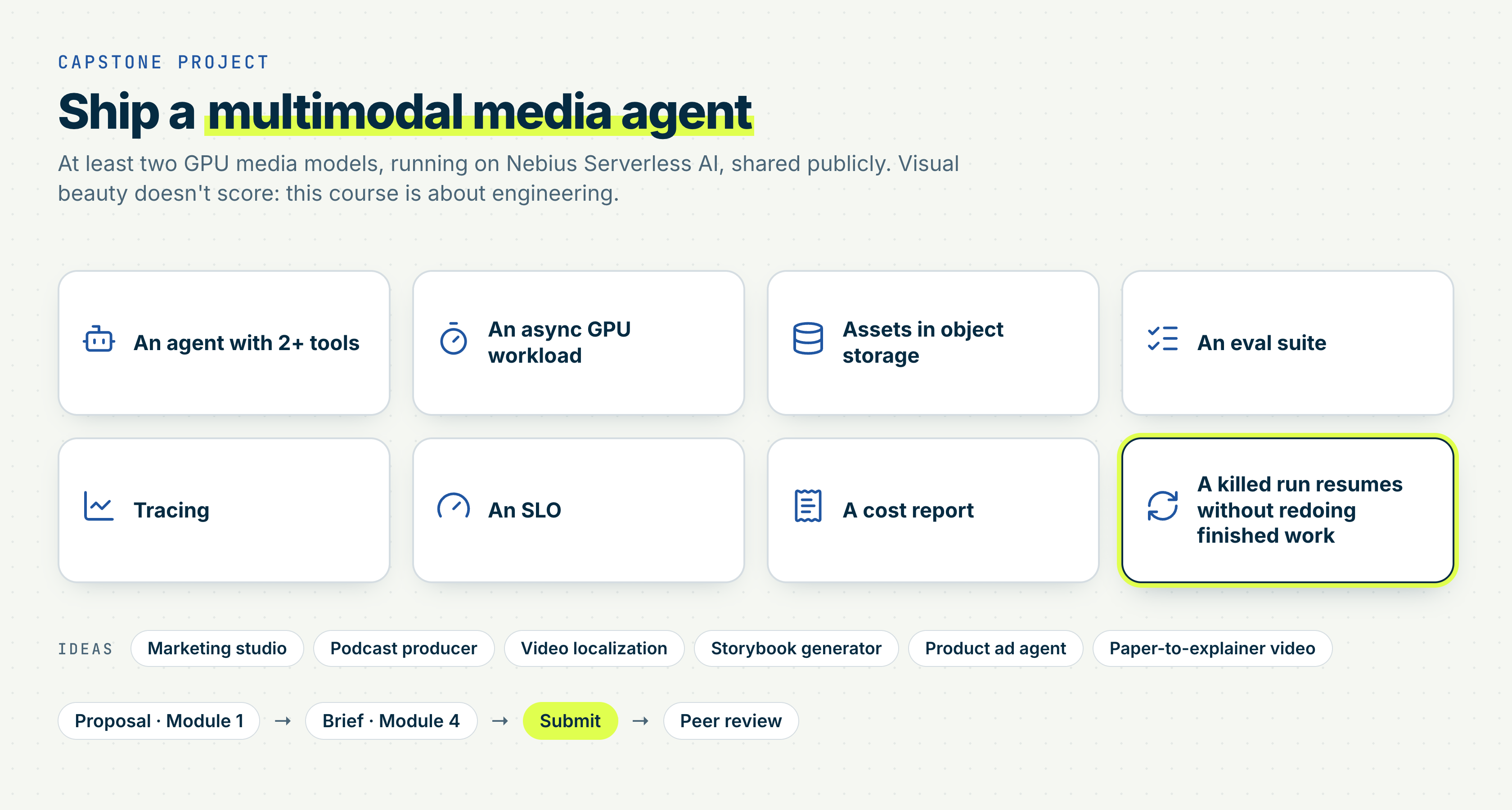
You can use any data you want. If you don’t know what to work on, we’ll share some ideas, like a marketing studio or a podcast producer.
When you describe your project, don’t focus only on the demo. Write about the problems you had and how you solved them, like a model that kept failing or costs that were too high. Hiring managers want to see that you understand how the system works.
Some of you may want to turn the capstone into a product later. For peer review, we need to see the code on GitHub. If you want to keep some parts private, move them into a separate package that your project installs as a dependency. If you fine-tune a model, you don’t have to share the weights. An endpoint that reviewers can test is enough.
The Stack
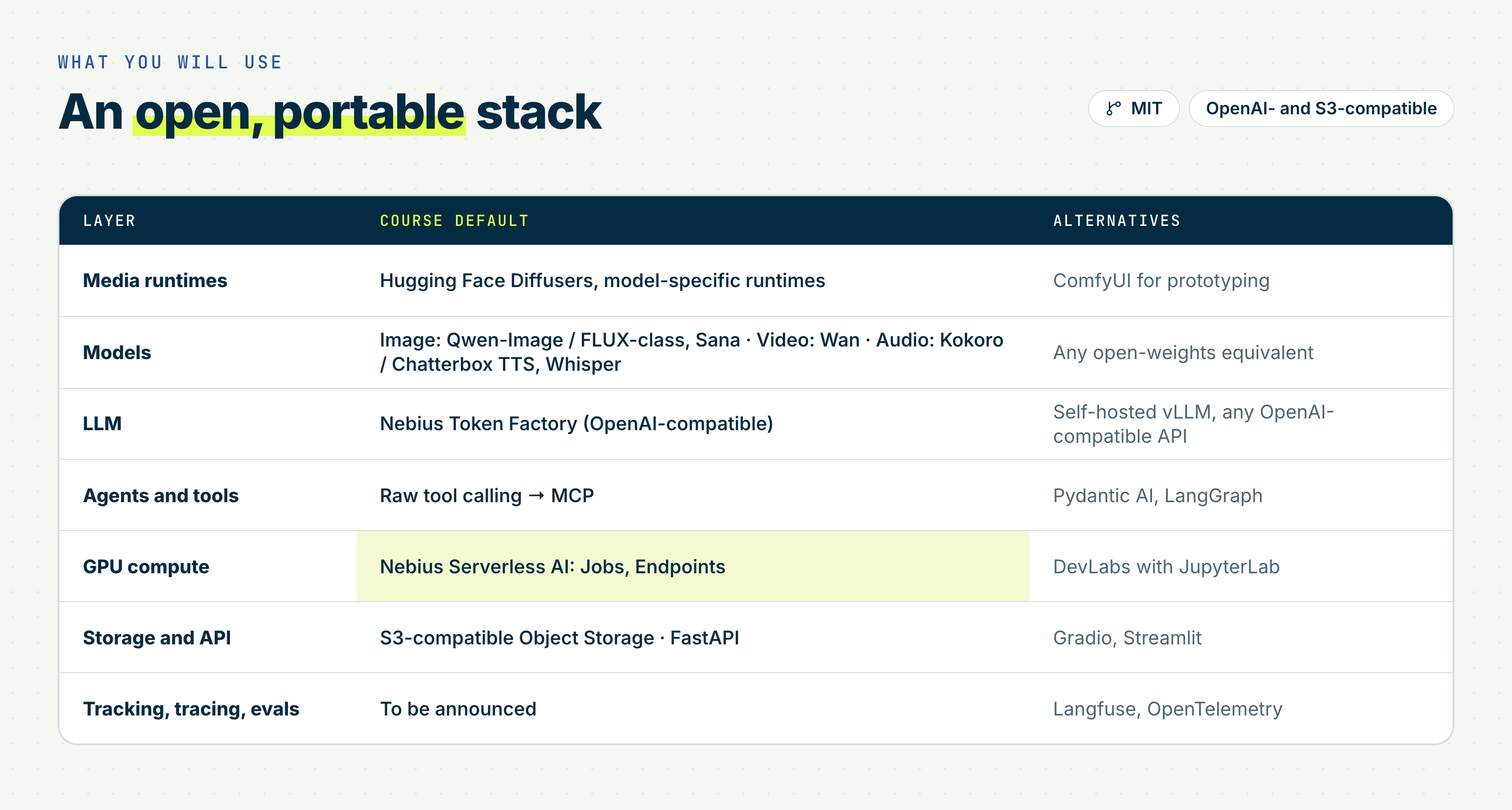
We use Nebius Serverless AI for GPUs and Nebius Token Factory for the LLMs. The code is MIT-licensed, and it only uses OpenAI-compatible and S3-compatible services, so you can also run it elsewhere.
Each open-weights model comes with its own licence, so check it before you use the model commercially.
Prerequisites
The course isn’t for complete beginners.
We had these people in mind when we were preparing the course:
AI and ML engineers who already work with models and want to add agents or run media pipelines in production
Software engineers who integrate open-source models into their applications
Researchers who write code. If you know some Python, Git, and Docker, you’ll be fine
Technical founders who pay for media APIs per call and want to know when self-hosting is cheaper
You don’t need a machine learning background, because the course is about engineering. But you need to be comfortable with Python, Docker basics, HTTP APIs, and the command line. We read and explain a lot of code, so without coding experience, the course will be hard to follow.
You don’t need formal work experience to get in, so students are welcome too.
You also don’t need a GPU. If your laptop can run Python 3.11, that’s enough, because the agent runs locally and calls remote endpoints. If your laptop is too old even for that, Nebius DevLabs gives you JupyterLab in the cloud.
You can also run the models on your own hardware and point the agent to local endpoints. On a laptop with integrated graphics, generation will take a long time, but a recent MacBook Pro or Mac Studio has a better chance. Making the pipeline run on local hardware with smaller models would be a good capstone project.
We don’t cover diffusion maths or training foundation models. CUDA, Kubernetes, RAG, and LLM fundamentals aren’t part of the course either.
Applying
The course is free, but we have limited seats in the live cohort, so you need to apply. More than 1,160 people have applied so far. We process applications once a day, usually in the evening European time, and you get an email with the decision.
Our emails may end up in spam or promotions, so please check there. If you use Gmail, drag our email to the primary tab. Then Gmail learns that our emails are important, and you won’t miss the weekly updates.
A few people wrote to me after they got a rejection email. If we reject you, the only thing you miss is access to the Nebius platform. All the materials are public, so you can still go through the course, do the homework, and add the project to your portfolio. You’ll need to find a different way to access GPUs and other resources to run the code.
GPU Credits
Everyone we accept gets GPU credits through the Nebius AI Builder Program, which is free to join. You get $25 at the start and another $50 after Homework 2.
Please request the credits after 16 November, not before. Nebius adds compute credits to the program on that day, and we’ll send you an email with instructions. Nebius may take a couple of days to approve your request.
If you applied to the program earlier, Nebius can add the credits manually. Ask in Slack if they don’t show up.
A regular GPU costs roughly $2 to $3 per hour, and spot instances are much cheaper. So $75 gives you a good amount of GPU time.
Dates
The deadlines in our course are strict. Once we score a homework form, the answers are public, so we can’t accept late submissions. I know life happens, and sometimes you need a break for a few weeks. If you fall behind, keep going at your own pace and aim for the second capstone attempt.
All times are CET, and modules run from Monday to Sunday:
Monday, 16 November, 17:00 to 18:00: launch stream
16 to 29 November: Module 1 (two weeks), Homework 1, and the capstone proposal
30 November to 6 December: Module 2, Homework 2 due on 6 December
7 to 13 December: Module 3, Homework 3 (leaderboard) due on 13 December
14 to 20 December: Module 4 and the capstone brief
15 January 2027: capstone, attempt 1
22 January 2027: peer review, attempt 1
29 January 2027: capstone, attempt 2
5 February 2027: final peer review, attempt 2
We may still change the materials and the dates.
Referrals
We also added personal referral links to this course. After you’re accepted, you get your link in the email. If someone you invite gets accepted, you get a point on the leaderboard. You also get points for correct homework answers and for sharing your progress online.
Credits
Mikhail Rozhkov, Marouane Khoukh, and Aleksandr Iziumov from the Nebius DevRel team created the course. They’ll be the main instructors, and I’ll help where I can. Thanks to the Nebius and Nebius Academy teams for preparing the course and for giving GPU credits to everyone.
Links and Questions
If you have questions, ask in the DataTalks.Club Slack or come to the weekly office hour. I also shared the slides from the Q&A in Slack.
Here are all the links:
Apply for the course. It’s free, but seats in the live cohort are limited
Course repository with all the materials under the MIT licence
Launch stream on Monday, 16 November, at 17:00 CET
Pre-course Q&A recording with more questions about the course, the credits, and the prerequisites
DataTalks.Club Slack for questions
And please star the course repository - it takes five seconds, and if the repo gets into GitHub trending, more people will find the course.
See you on Monday!