

FAQ assistant is the system that we use in DataTalks.Club to help thousands of our students find the answers to their questions faster.
There are two components:
FAQ curation: building the FAQ dataset from student contributions, Slack discussions, and YouTube transcripts. It lives in DataTalksClub/faq.
FAQ retrieval: the Slack bot that answers students’ questions using this dataset. It lives in DataTalksClub/faq-assistant and runs on AWS Lambda.
In this article, I want to describe these components and the entire project in more detail:
the data sources and how they become the FAQ dataset
the architecture and how data flows through it
the decisions I made and why I made them
how I evaluate each part of the system
ZoomcampQABot
Yes, I already wrote about the FAQ assistant in From Google Docs to an Automated FAQ System for DataTalks.Club Courses.
In that article, I described the ZoomcampQABot bot developed by Alex Litvinov. When it occasionally breaks down, I have to pull in Alex and ask him to fix the issue. Sometimes it would be handling an expired key, or sometimes it’s fixing a small bug.
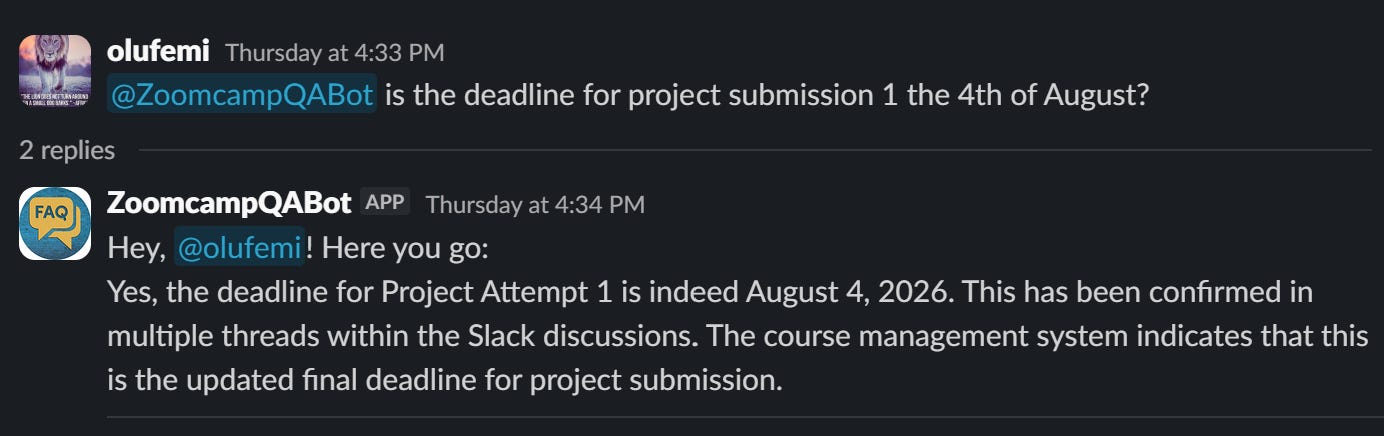
ZoomcampQABot in actionTwo months ago his OpenAI account ran out of money, so the bot stopped working. I had to ping Alex again. I always felt bad that he uses his own money to pay for the project, so I offered to take it over and run it in the DataTalks.Club infra. Typically he’d decline it, but this time he agreed.
This is the setup ZoomcampQABot uses:
OpenAI for generating the answers
Fly.io for hosting
HuggingFace for embeddings
Milvus for vector search, running on Zilliz Cloud in production, with four collections and query engines
Cohere for reranking
Upstash Redis as an embeddings cache
LangSmith for feedback logging
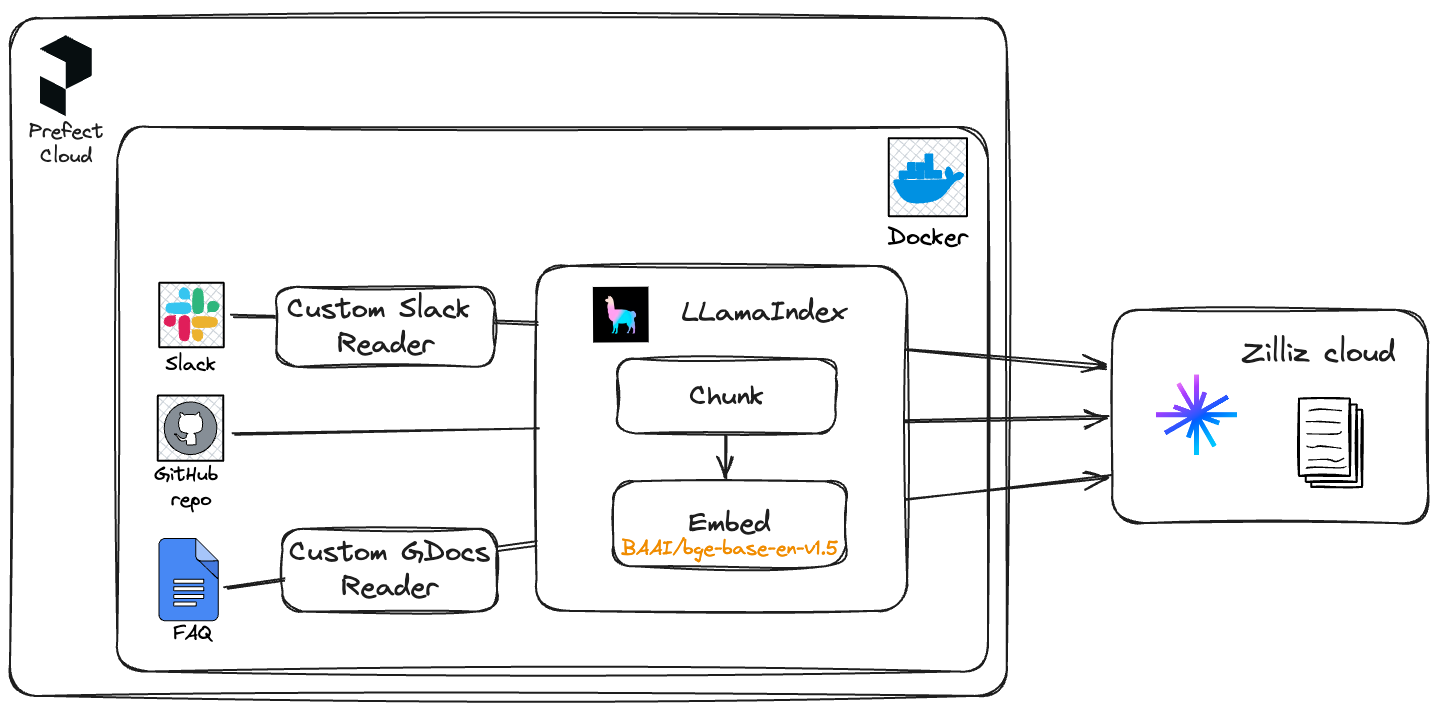
The data comes from multiple sources:
the FAQ dataset
Slack history
Course GitHub repository data
YouTube transcripts
Each course has a separate ingest entrypoint on its own cron job in GitHub Actions. YouTube videos are pulled in manually.
This setup makes a lot of sense, but I couldn’t port it easily to the DataTalks.Club infra. I wanted to use it in combination with the Au-Tomator Slack Bot that I described in Building and Maintaining a Slack Moderation Bot for an 88k-Member Community.
The Au-Tomator bot runs on Serverless - on AWS Lambda. It’s been running for years now and I never had to pay for it: it was always under the free tier for AWS Lambda usage. And when I have to pay for it, I expect it to be minimal. So I wanted to run the FAQ bot on Serverless too.
So I had to redesign the Slack bot. I’ll describe the result later in the article, but now I’ll cover the main data source: the FAQ dataset. This dataset influenced many architectural decisions in the assistant, so I want to talk about it first.
Part 1: The FAQ Dataset
The FAQ dataset is open for everyone. We host the website via GitHub pages and the data is in the DataTalksClub/faq repository.
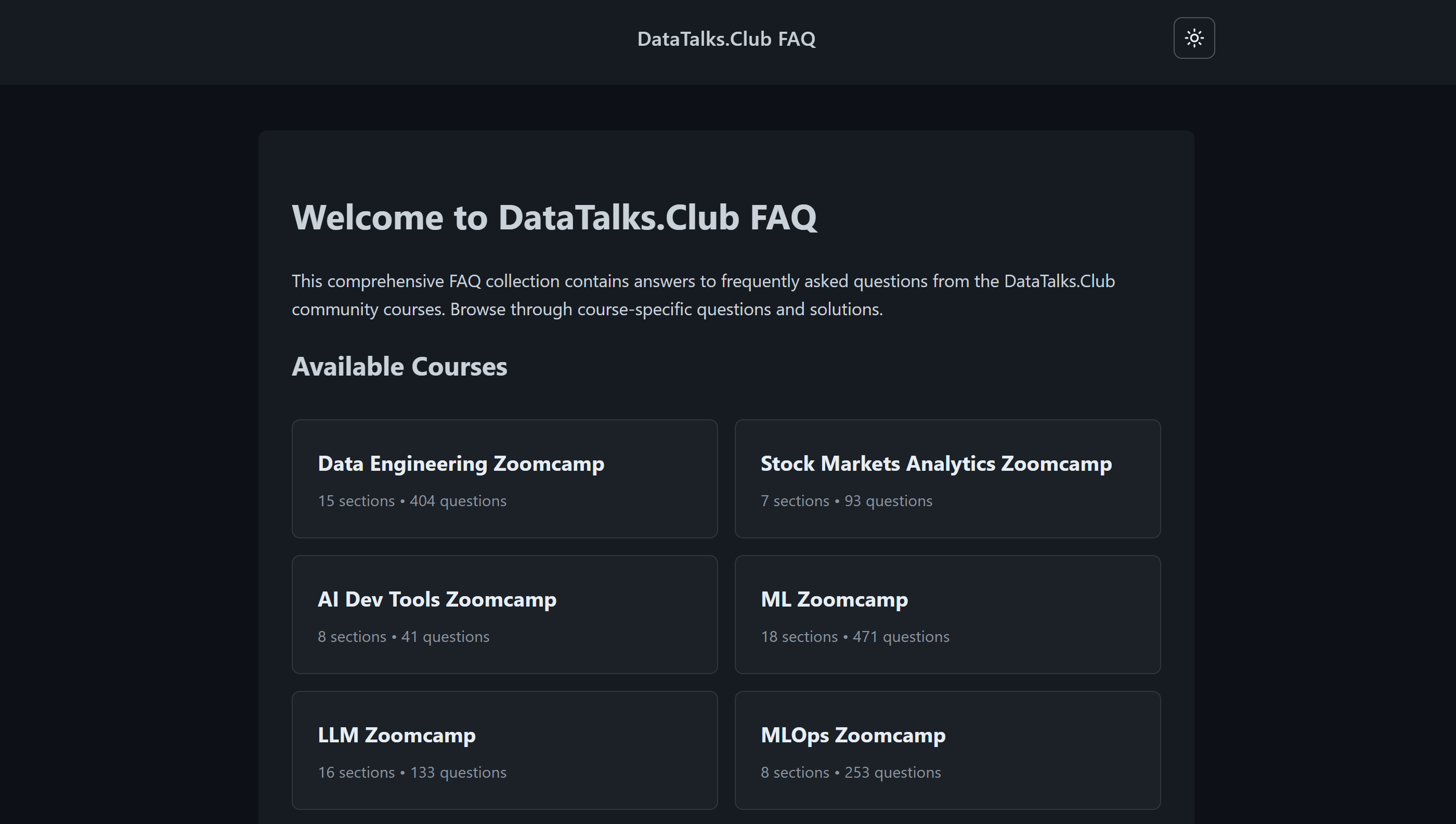
Previously it lived in a bunch of Google Docs. It was convenient, but this approach had a few problems:
It was frequently vandalized, so I had to manually roll the documents back.
I wanted to automate the curation with AI, but using AI in Google Docs is not trivial.
Eventually I moved the data to a bunch of markdown files. I described the migration process in From Google Docs to an Automated FAQ System for DataTalks.Club Courses.
Now with AI assistants I spend a lot less time maintaining this dataset, and I can keep it clean and up-to-date.
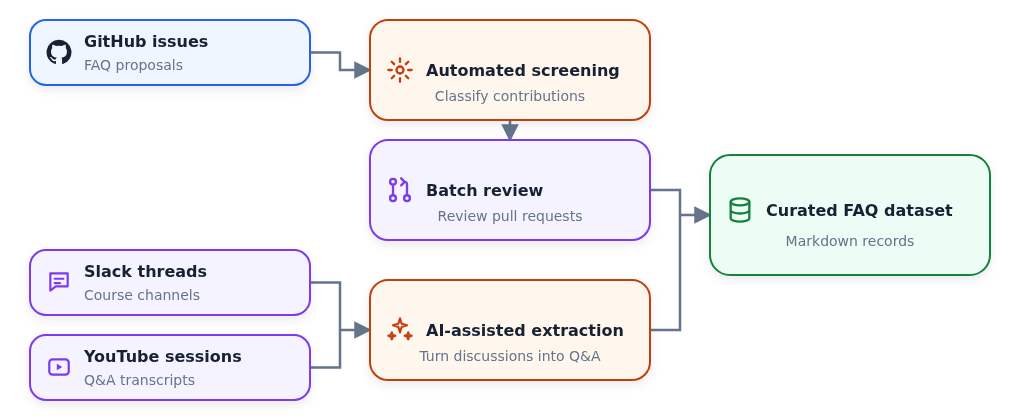
There are multiple sources of questions for the FAQ dataset:
The questions that people contributed via GitHub
Discussions in Slack
Q&A videos on YouTube
FAQ Automation: User-Contributed FAQ Records
Anyone can contribute to the FAQ dataset:
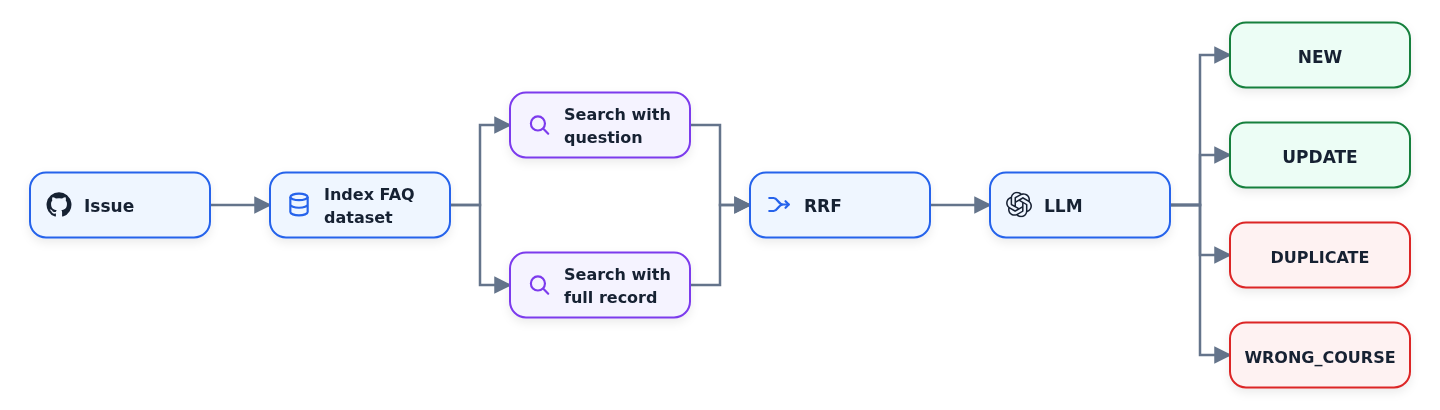
You submit an issue, specifying the question, the course and your answer.
A GitHub Actions workflow indexes the entire dataset with minsearch.
It then searches twice - on the question alone, and on the question and answer together - and combines the two results with reciprocal rank fusion.
It sends the results to OpenAI, which returns a structured decision:
NEW,UPDATE,DUPLICATEorWRONG_COURSE.For
NEWorUPDATE, it opens a pull request.For
DUPLICATEorWRONG_COURSE, it closes the issue.
FAQ Automation Evaluations
When the first version of the script was created, we didn’t have any evaluation set. I mostly relied on my gut feeling. But as more people started using it, the number of incorrect decisions increased. I needed to improve it. Naturally, I didn’t want to fix it blindly and just hope for the best: I needed a proper evaluation framework.
For creating it, I used those incorrect decisions. I analyzed the issues where I needed to manually adjust the result, and focused on the cases that were sufficiently different from each other.
Not all decisions made by the script are equal. If the agent makes a mistake in a NEW or UPDATE decision, it’s easy to correct. I use AI assistants to help me with that.
But if the decision is DUPLICATE or WRONG_COURSE, the PR will never be created, and the issue will be closed. In this case, I will not even have a chance to review them. Thus, a mistake in this case is way more expensive. Which means, I had to give these cases more importance in the eval set to make sure that these cases don’t happen often.
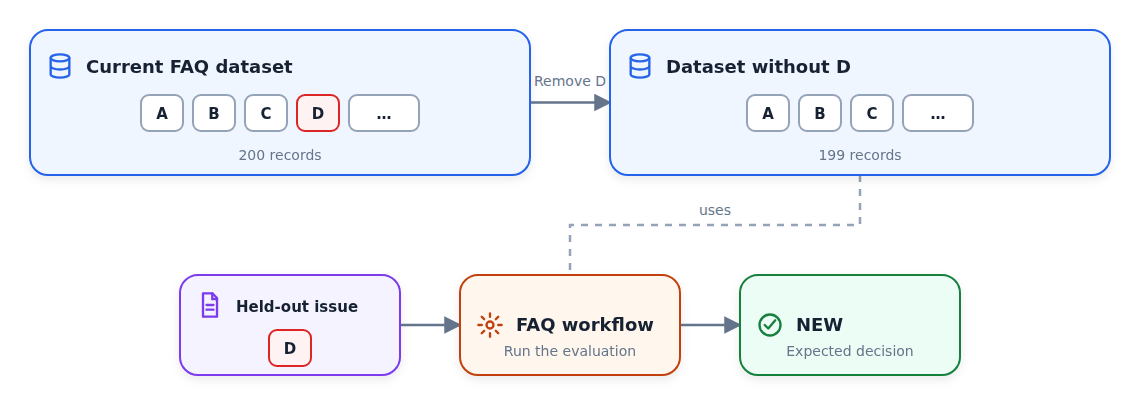
There’s also a problem with collecting the evals data from historical decisions. The FAQ data is constantly changing, so we have to use a “leave-one-out” setup.
When the script decides that something is NEW and we later use it in the evals, it’s no longer NEW: the item was already merged into the dataset. So if we run it with the same issue again, it will say DUPLICATE instead of NEW.
In order to properly test the NEW cases, we therefore need to remove the record from our dataset. So if we have 200 records, and the record D is the one we added, we remove the D and test this case against the remaining 199 records.
When I analyzed all my past corrections, the most common error turned out to be incorrect section placement. For example, instead of placing a record about projects in the “Project” section, it would place it in “General”. My eval set also tests for that.
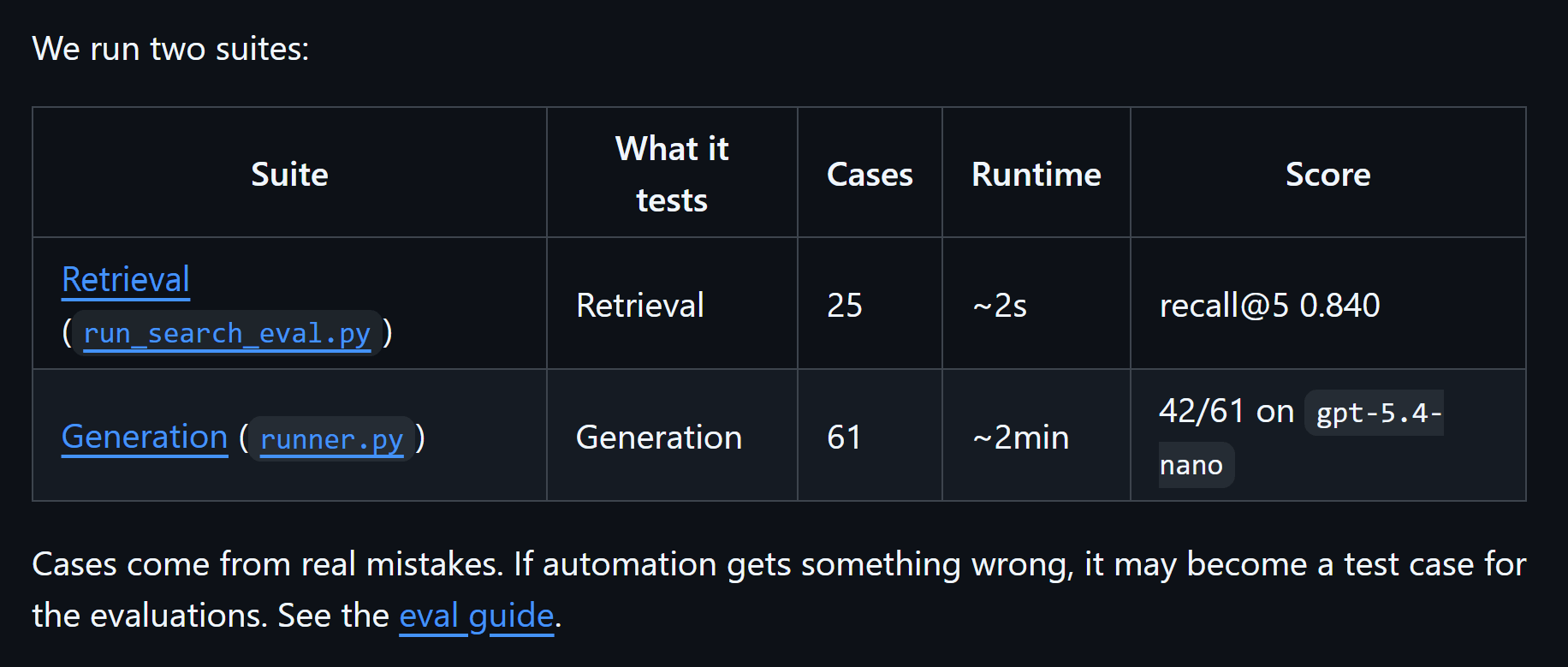
Right now I have 61 cases:
38 expecting
NEW10 expecting
DUPLICATE7 expecting
WRONG_COURSE4 not expecting
WRONG_COURSE2 expecting
UPDATE
In addition to testing the whole flow, I have a retrieval-only evaluation set. I use this part to test that duplicate detection works correctly. This part is less interesting, so I’ll skip it. You can read more about it in the project’s README.
Bulk Reviewing
I usually let the PRs accumulate and process them every two weeks.
For that, I use AI assistants. I have a custom skill that lets me go through each PR and merge it as is, or fix it if it’s not correct.
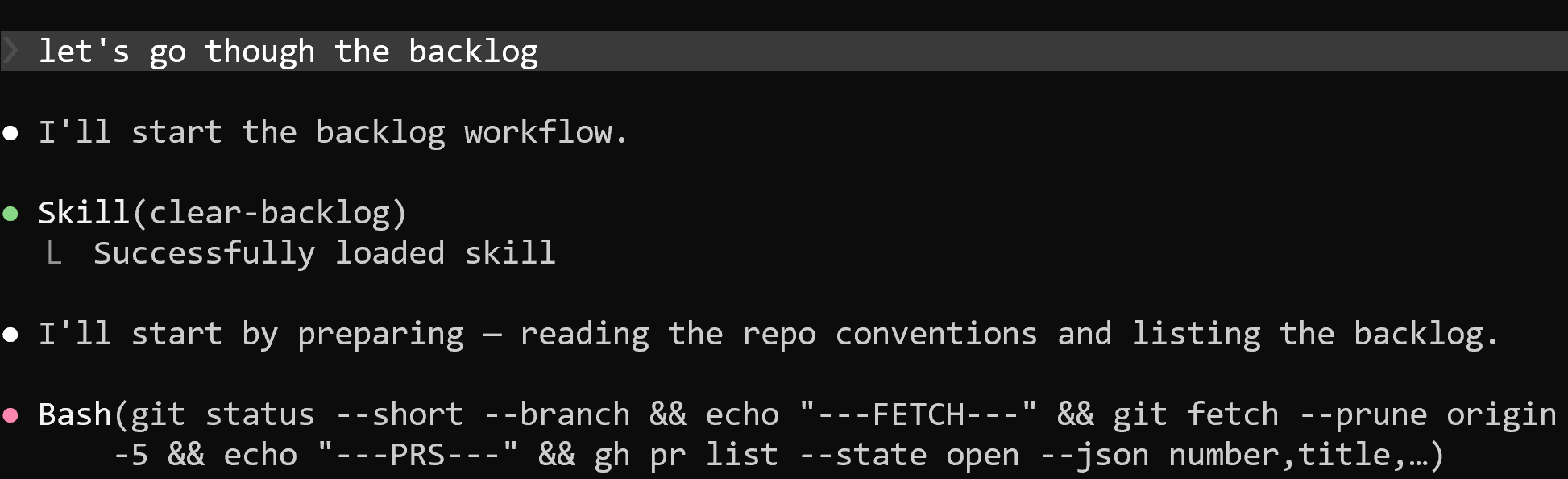
If I come across an interesting error, I ask the assistant to add it to our evals set. I don’t try to fix it immediately. I wait till we have a few more cases, then I ask the assistant to see if there are simple ways to fix them.
If some cases can’t be fixed easily, I don’t sweat over it. I just let it sit in the evals with a FAIL status. I don’t want the system prompt to grow too large and handle all the corner cases. But I do want to know that these corner cases exist.
Other Sources: Slack and YouTube
Our Slack is very active. Course participants are asking questions and helping each other. In many cases, these discussions are worth saving in the FAQ dataset.
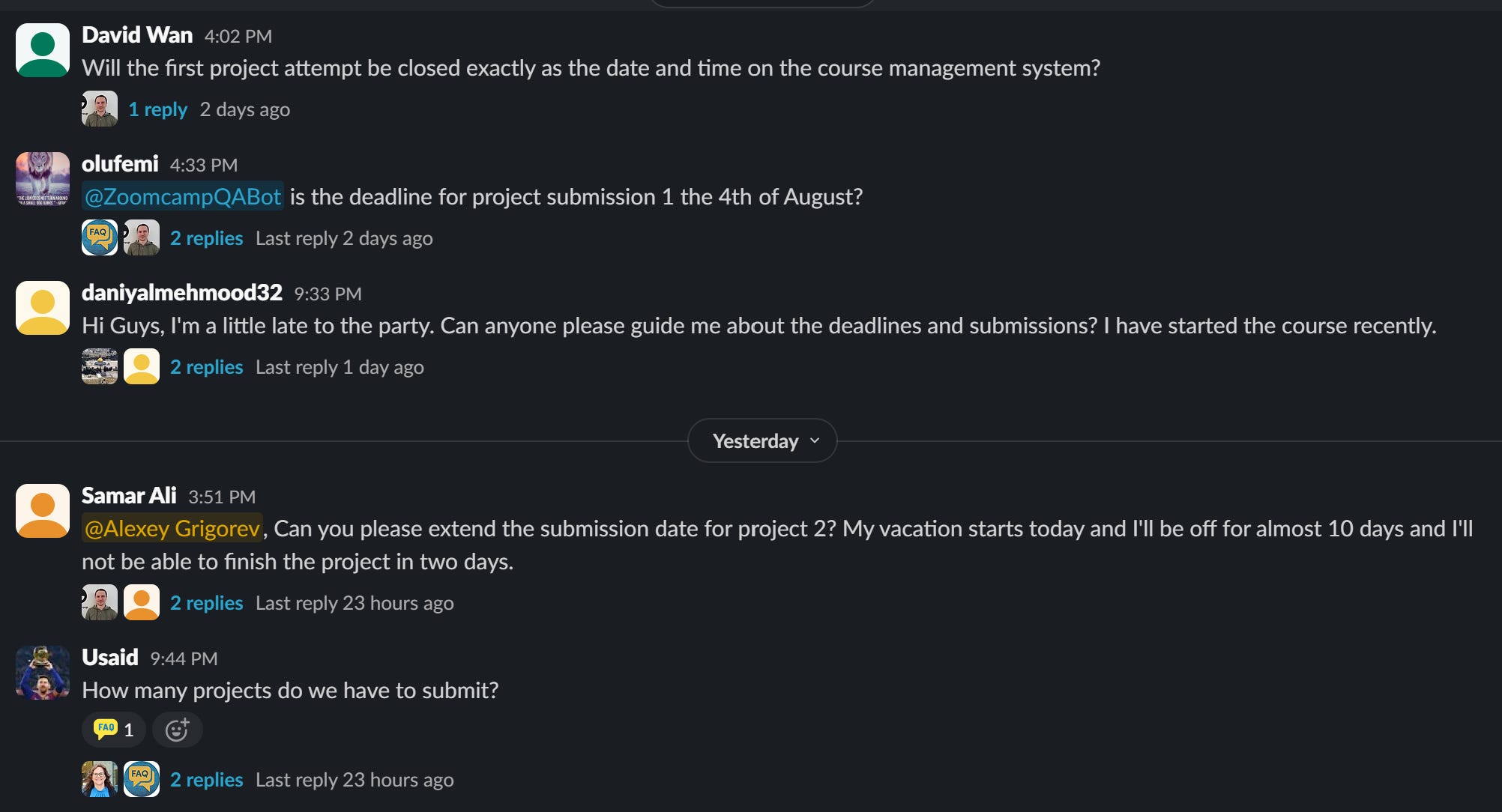
For that I regularly go through all the Slack threads. I ask my AI assistant to go through each thread, and if something is useful, it’s saved as a new record.
Also, for each course I run a few live YouTube sessions, for example:
pre-course Q&A session
course launch streams
occasional office hours
I get the transcript and use AI assistant to extract potential Q&A candidates. If there’s something new, it also goes to the dataset.
Part 1 Overview
The main focus of the first part is the dataset curation.
I review all the PRs that our FAQ automation creates in batches, and use AI to turn Slack discussions and YouTube videos into focused FAQ records.
Now let’s go back to the retrieval side. This FAQ dataset is used as the main data source for the Slack bot.
Part 2: Slack Bot
When you mention @Au-Tomator (my bot) or @ZoomcampQABot from Alex, both would perform RAG:
Use search to fetch the candidate FAQ records
Pass them to OpenAI
Return the answer from the LLM and post it in the thread as a reply
ZoomcampQABot has a lot of moving parts though. Most of them are not straightforward to deploy to the serverless environment. So I decided to simplify it.
The first thing I dropped was indexing Slack threads and YouTube videos. I already extract this information and put it directly to the FAQ dataset, so this part is not needed anymore.
Second, I removed the vector database. I know that it improves retrieval, but at the cost of having to maintain more infra. I want to keep the setup very lean. If the bot is sometimes not right, it’s not a huge problem: I and other community members can simply correct it in Slack.
Zero-Dependency Serverless Deployment
My to-go search library for text search is minsearch. I wrote about it in Minsearch: The Small Search Library Behind My RAG Workshops and Courses.
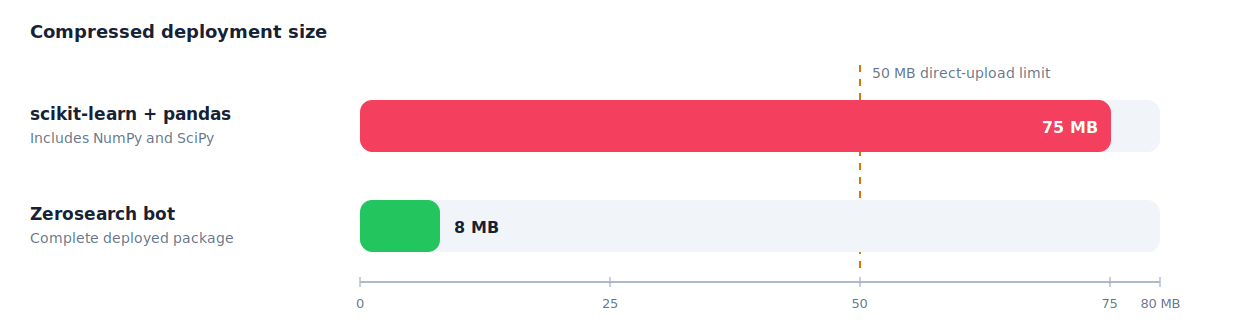
However, deploying minsearch to AWS Lambda isn’t trivial. When I created this library, my focus was on teaching the concepts, not on deploying it to serverless. Internally, it users Scikit-Learn and Pandas, and these libraries in turn pull in numpy and scipy. Normally, everyone working with data already has these libraries in their standard setup. But for Lambda, they are too heavy and take well over the 50 MB limit.
So I decided to replace minsearch with a zero-dependency search engine written entirely in pure-Python. I called it zerosearch. It has only one optional dependency - stemlite, which is a stemmer I use across all my small search libraries (zerosearch, minsearch and SQLiteSearch).
Another challenge was Pydantic. We typically use for structured output, and it works fine in usual environments, but it’s not trivial to get it right for Lambda. It has a compiled Rust core, and you need to make sure the binaries that you send package into your Lambda deployment are compatible. Plus, loading the binaries core and building the model schemas adds to the cold start time.
So I removed it along with requests and did all the calls to OpenAI using only the standard Python library.
Keeping the Index Fresh
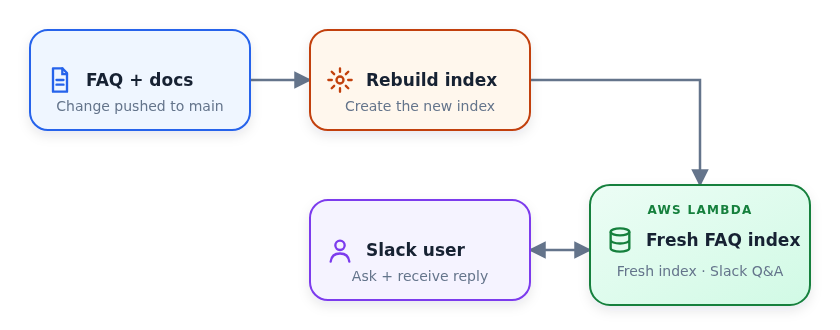
Then I started thinking about what to do with updating the index. If a record in the FAQ changes, the search needs to reflect it. Alex solved that by pulling in data using a daily cron job. But I wanted to do this as soon as the data in FAQ changes.
Almost all my projects have a CI/CD workflow: when I push to main, the code change is propagated to a live environment. I usually use it for code changes, but for this project I did the same for data changes too.
When a push happens, I re-build the whole index, and push it together with the source code in Lambda. It’s quite small: it’s 8 MB total.
Once it’s deployed, the lambda loads the local updated index, and can serve the fresh data.
FAQ Assistant Retrieval Evaluation
I replaced vector search with text search, and used zerosearch to make it fast and work well in Serverless. But it would still lose to vector search in terms of retrieval quality.
How can I make sure I squeeze the absolute best from text search? For that I needed to have a proper evaluation set.
I built the ground truth dataset from real Slack threads:
Get a Slack dump with all the course channels
Take all the Slack threads (9,900 of them)
Filter them down to keep actual questions
At the end, I had a sample of 130 records:
60 for Data Engineering Zoomcamp
40 Stock Markets Analytics
30 AI Dev Tools
For each of the questions, I found and marked the correct documents in the index. Then I evaluated the hit-rate and MRR at k=1,3,5.
Once I had this dataset, I could start experimenting with search optimization.
I tried multiple options:
Taking raw question as is
Keyword expansion
Different variants of query rewriting
The best option is to take a Slack message and turn it into a bunch of keywords while preserving exact error messages, tool names, commands and filenames.
For example, it turns this Slack message:
Does anyone know why minsearch fails when I run
uv run python index.py? I getKeyError: 'course'after renamingdocuments.jsontofaq.json.
into these keywords:
minsearch FAQ indexing course field "KeyError: 'course'" "uv run python index.py" index.py documents.json faq.jsonFor query rewriting I use gpt-4o-mini because it’s the fastest and cheapest model, but for the actual generation I rely on gpt-5.4-mini.
FAQ Assistant Generation Evaluation
In the previous part I explained how I evaluate search. I also evaluate generation.
For the evaluation dataset, I collect feedback from Slack. When a bot answers a question, and somebody corrects it or add something extra, it means that the bot couldn’t answer the question properly. So we can include this question in the evals.
So far it’s not large and has a few cases like:
the answer from the bot is incomplete
the answer is incorrect
the search doesn’t find anything
Most of the time the way to fix these problems is not tuning the prompt, but fixing the FAQ dataset itself. I check why a record wasn’t retrieved, or why the answer didn’t contain the correct information, and then see how I should update the FAQ records to make it work next time.
Then I’d fix the record, re-run evaluation, and re-deploy the bot.
Deploying with Au-Tomator
I use Au-Tomator to help me with Slack management. So I wanted to use the existing setup, not create a new Slack bot.
I already have two Lambdas for Au-Tomator:
The router: routes and filters Slack events. It also makes sure we acknowledge the request from Slack quickly within 3 seconds (a requirement from Slack) and forward the request to the next lambda.
The automator: the bot itself, it handles all the reactions.
And I added the third one:
The FAQ assistant: rewrites the question, searches the index, and generates the answer
Now when you mention the bot, it first goes to Au-Tomator, and then Au-Tomator sends it to the FAQ assistant. The assistant gets in the question, and send back the answers. Posting the response to Slack is handled by Au-Tomator.
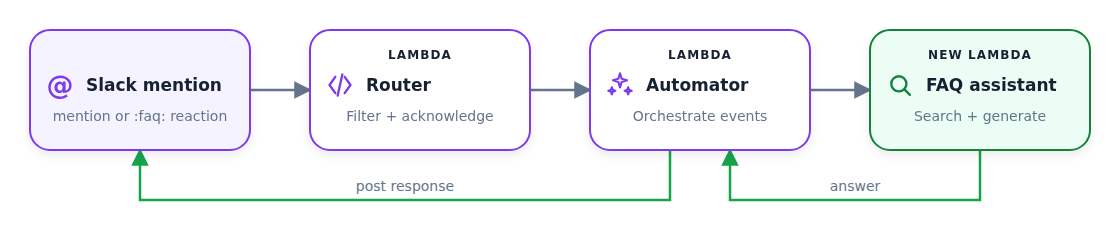
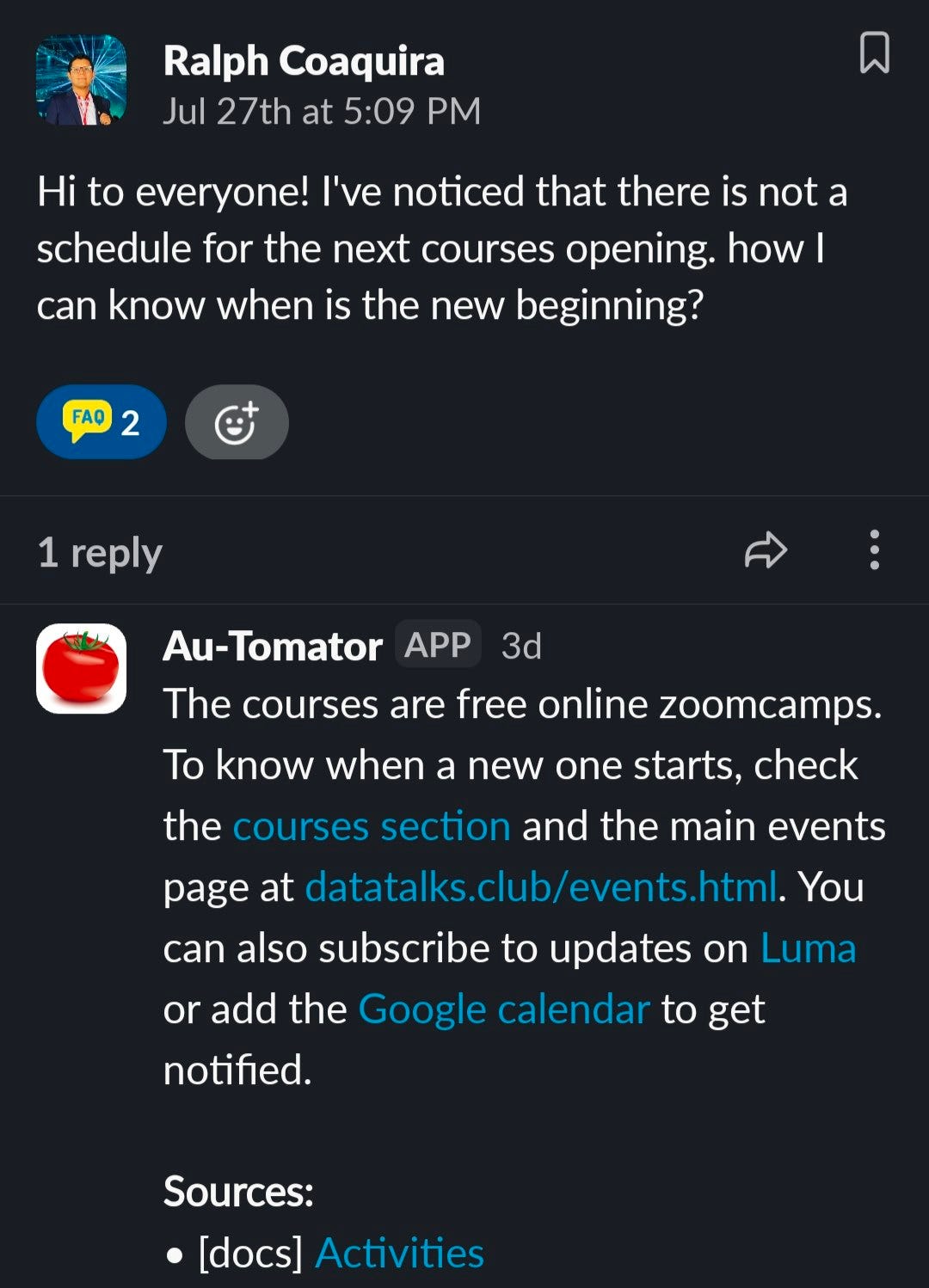
As a bonus, now with this setup, I can trigger the FAQ assistant with :faq: reaction. Previously this reaction would only post a message to the Slack thread saying “Go check the FAQ”.
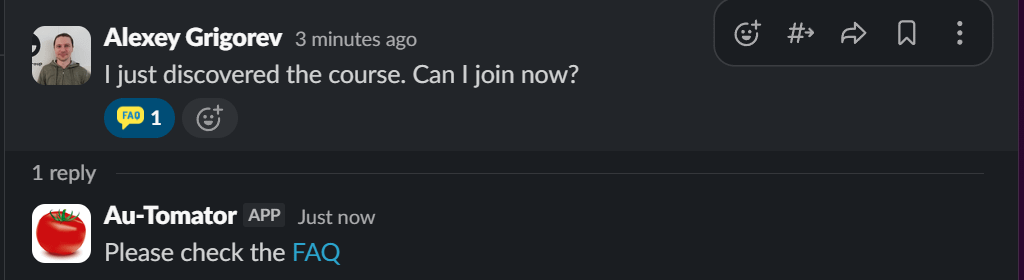
Now it actually checks the FAQ and generates the answer.
Other Retrieval Sources
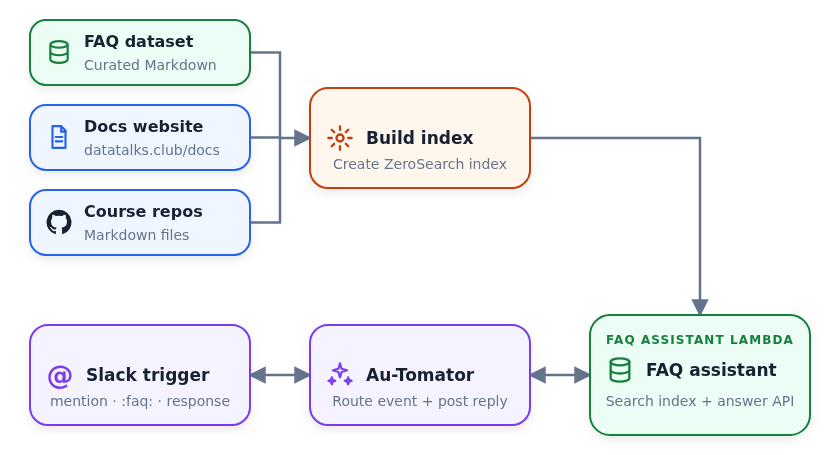
I don’t only search the FAQ dataset. I also index the DataTalks.Club documentation and the Markdown files from each course repository.
I combine all three sources into one search index and package it with the FAQ assistant Lambda. In Slack, either a mention or a :faq: reaction triggers Au-Tomator. It sends the question to the assistant and posts the answer back to the thread.
The Full Picture
In this article, we discussed the two parts of the FAQ system:
The FAQ dataset, where we primarily talked about the dataset curation
The FAQ assistant, which is a Slack bot deployed via AWS Lambda
The FAQ assistant reads data from the FAQ dataset and helps students find answers to their questions faster.
This is how the entire system looks like:
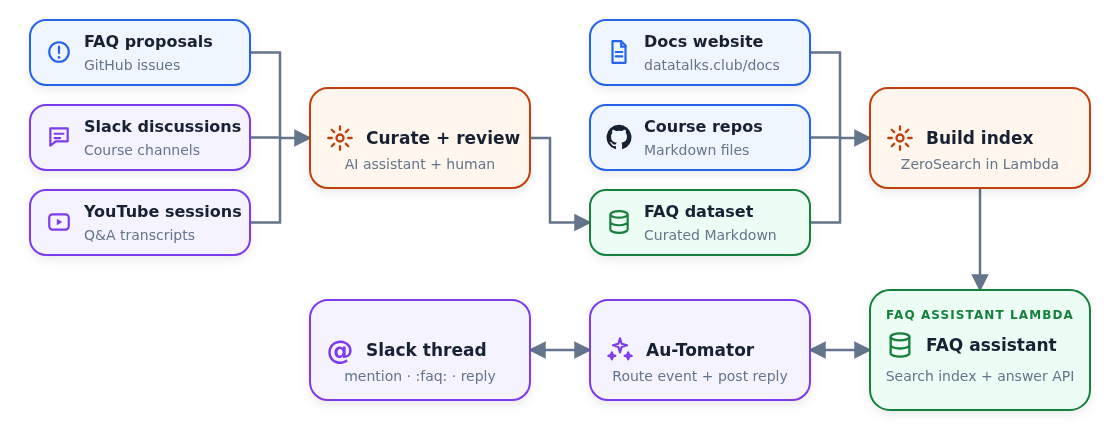
I turn GitHub issues, useful Slack discussions, and live-session transcripts into reviewed FAQ records.
I combine the FAQ, docs website, and course-repository Markdown into a zerosearch index. The index is rebuilt every time we push to the FAQ repo.
A mention or
:faq:reaction triggers Au-Tomator that sends the question to the FAQ assistant and publishes the answer in Slack.I use wrong and missing answers as evaluation cases and FAQ updates, so the next index contains the correction.
Curation over Complexity
This year, I re-recorded the entire LLM Zoomcamp course from scratch. There, we use the FAQ dataset as the main running example.
When I introduce the FAQ dataset, and we do the first RAG example, I mention that the example looks very simple. But the reason it looks so simple is because the complex work has already happened: the dataset was already cleaned and prepared. In reality, in your AI projects, most of the time will go into data cleaning and data curation.
In this article, I tried to explain how exactly I did it.
We can always have a better model, use a vector database, or a faster machine, but none of that will help if your data is missing, outdated or unclear.
When the assistant gives a bad answer, it’s not because of the tech stack, but because of the data. So the most useful fix to make it better is to improve the dataset.
In the FAQ case, I collect the feedback from real users, use it to improve the underlying dataset and thus improve the system itself:
Students contribute issues to the FAQ dataset.
Useful discussions in Slack become curated FAQ records.
The updated dataset is indexed and deployed with the Lambda.
Au-Tomator uses it to answer future questions.
Incorrect or incomplete answers become evaluation cases and help improve the system.
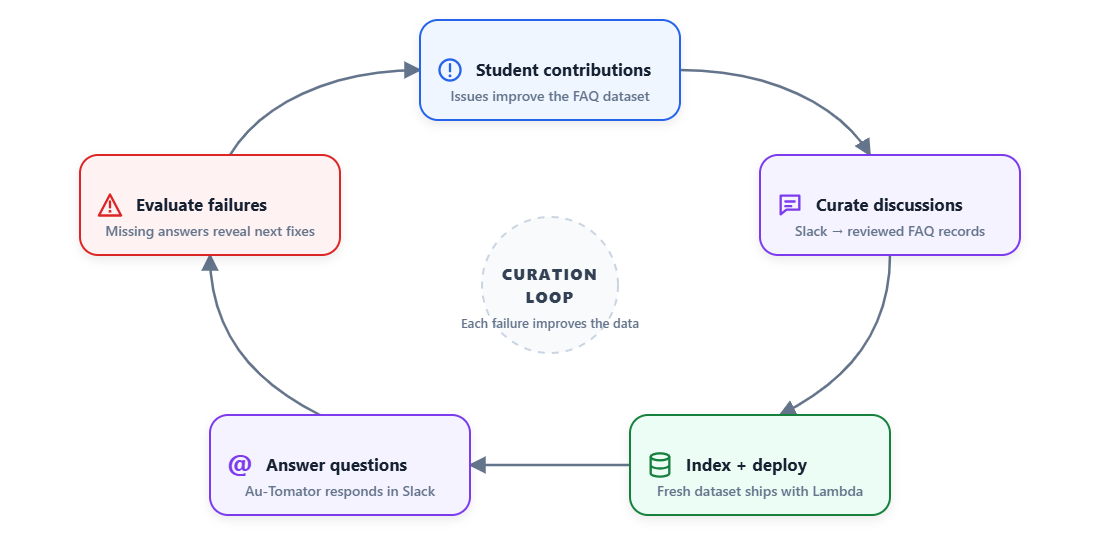
Because of this loop, I’m comfortable with a simpler architecture that I described in this article.